Make AI agents that work in your base
Make an agent with its instructions and roles, pick where it runs, try it before you save it, chat with it, and let it work by itself from an automation.
An agent is an AI worker you set up in your base: a name, instructions in your words and roles of its own. It reads and changes the base's items, as a user of your team would, with the same permissions as its roles and never more. You chat with it, or it works by itself when an automation or a workflow hands it an item.
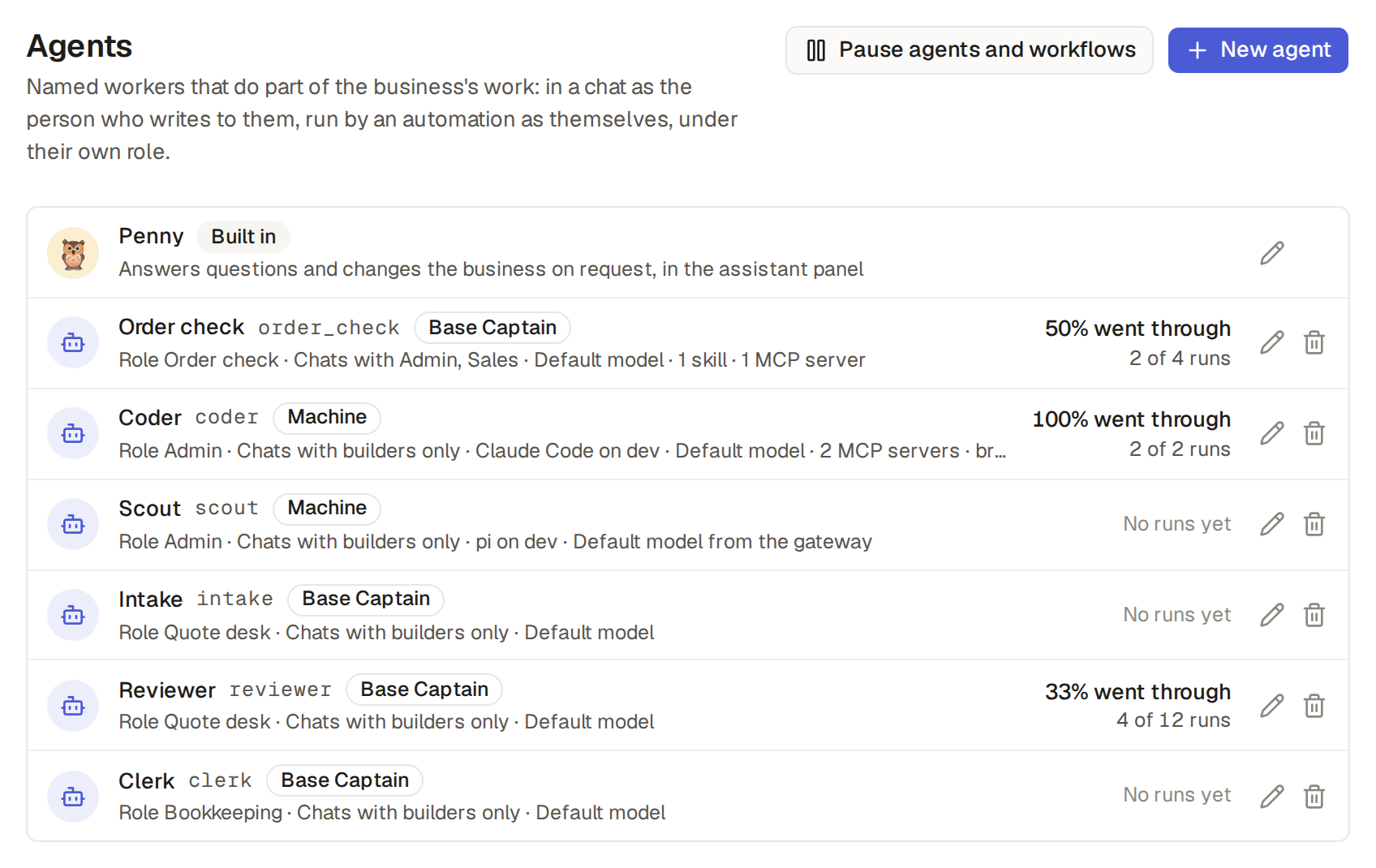
An agent's Runs on says where it works. The first three are the agents in Base Captain: they work the same way, and only who supplies the AI model is different.
- Base Captain: "Runs in Base Captain. Base Captain supplies the AI model." An agent in Base Captain uses the AI that the base's plan includes. It works on the base's data, searches the web and reads web pages through a machine of yours or through AnyAPI, and takes pages' pictures through a machine of yours (Search the web, Ask a question about a web page, Take a picture of a web page).
- Claude API: "Runs in Base Captain. Anthropic supplies the AI model, with your API key."
- OpenAI API: "Runs in Base Captain. OpenAI supplies the AI model, with your API key." An agent on the Claude API or the OpenAI API has the same tools, web and MCP servers as an agent on Base Captain, but each of its calls to an AI model goes to Anthropic or OpenAI, under your base's own API key, and your account there pays for it (Run an agent on your own Claude API or OpenAI API key).
- Your machine: "Runs on a paired machine as a coding tool, with the login of that tool." A machine agent runs on a computer of yours, through Claude Code, Codex, pi or opencode, on that tool's own login, and does not use the plan's AI. opencode also works with no login, on its free models, each marked "free": the provider of a free model can keep what the agent reads and use it to train models. An agent on pi or opencode has the permission Tools only, Read its directory or Full access, never Approved edits, since those tools have no sandbox. A machine agent can also use that computer: a shell, files and a browser (Run agents on your own computer: machines).
The assistant is the base's own agent, in every base (Ask the assistant and review its changes). In Settings, Agents, it is the first row, with the mark Built in, also in a base with no agents; it shows Off when the base's Assistant switch is off. Its row opens its page, where the admins and the AI managers give it a name and a picture.
- In a chat, any agent can do for you what the assistant can (Chat with an agent); working by itself, an agent works on the base's items only.
- The assistant and every agent on Base Captain, in a chat with you too, use the AI of the base's plan (What AI your plan includes); at the fair-use limit, these agents stop first, and the assistant goes on so you can still change your base.
- An agent on the Claude API or the OpenAI API does not use the plan's AI and does not stop at the limit.
- The example shop has six: Order check, which sets the priority of new orders; Intake and Reviewer, which work the Quotes workflow; Clerk, which reads the invoices of new bills; and Coder and Scout, which run on a machine.
An agent is made on its own page in Settings, Agents, by the base's admins and AI managers (Roles and their types: admin, staff and external).
- Click Settings, then Agents, then New agent.
- Give it a Name, such as "Order helper".
- Under Runs on, click a card, Base Captain, Claude API, OpenAI API or Your machine, or pick one with the arrow keys. On the Claude API or the OpenAI API, also pick its API key (Run an agent on your own Claude API or OpenAI API key). Later, an agent can move among the first three, but never to or from Your machine.
- Leave Model and Reasoning empty for the defaults, and write its Instructions: what it does here and how, in your words, such as "You answer questions about the shop's orders and customers, briefly. Read before you answer."
- Pick its Roles, one or more: what it may read and write when it works by itself, here Sales. With several roles, it may do what any of them allows, as a user with several roles may (Give a user several roles). Give an agent roles that see only what its job needs (Invite users, owners and customers). The list offers only roles with nothing you lack: "Only an admin can give an agent the role Admin". An external role is never an agent's.
- Under Who may chat with it, tick the roles that find it in the assistant, here Manager. With none ticked, only the builders do.
- Tick the Skills and MCP servers it may use, if any. A skill that reaches every agent needs no tick (Teach agents with skills, and Connect an MCP server). Under each MCP server it chose, keep All tools or pick Only these tools and tick the ones it may use.
- Leave Internet as it is, or choose No internet for an agent that must never read the web (Keep an agent from the web).
- Click Save agent.
Under the API token of someone who builds the base (Use your base from a calendar or a script), the
agent is a part of the base's spec, and where it runs is its runs_on: "base_captain", "claude_api", "openai_api" or "machine". Through Base Captain's MCP server, get_agents shows it and propose_change sets it, with its put_agent. An agent cannot move to or from a machine.
Try it chats with an agent as its form holds it now, saved or not, so you see how it answers before you save a change to its instructions, its roles or its model. It is for the admins and the AI managers, on the page of an agent in Base Captain.
- In Settings, Agents, open the example shop's Order check, or start a new agent in Base Captain.
- Change the form without saving, for example add "Always answer in French." to its Instructions.
- Click Try it, beside Save, and ask, for example, "How many orders are pending?" Order check reads the orders and answers in French.
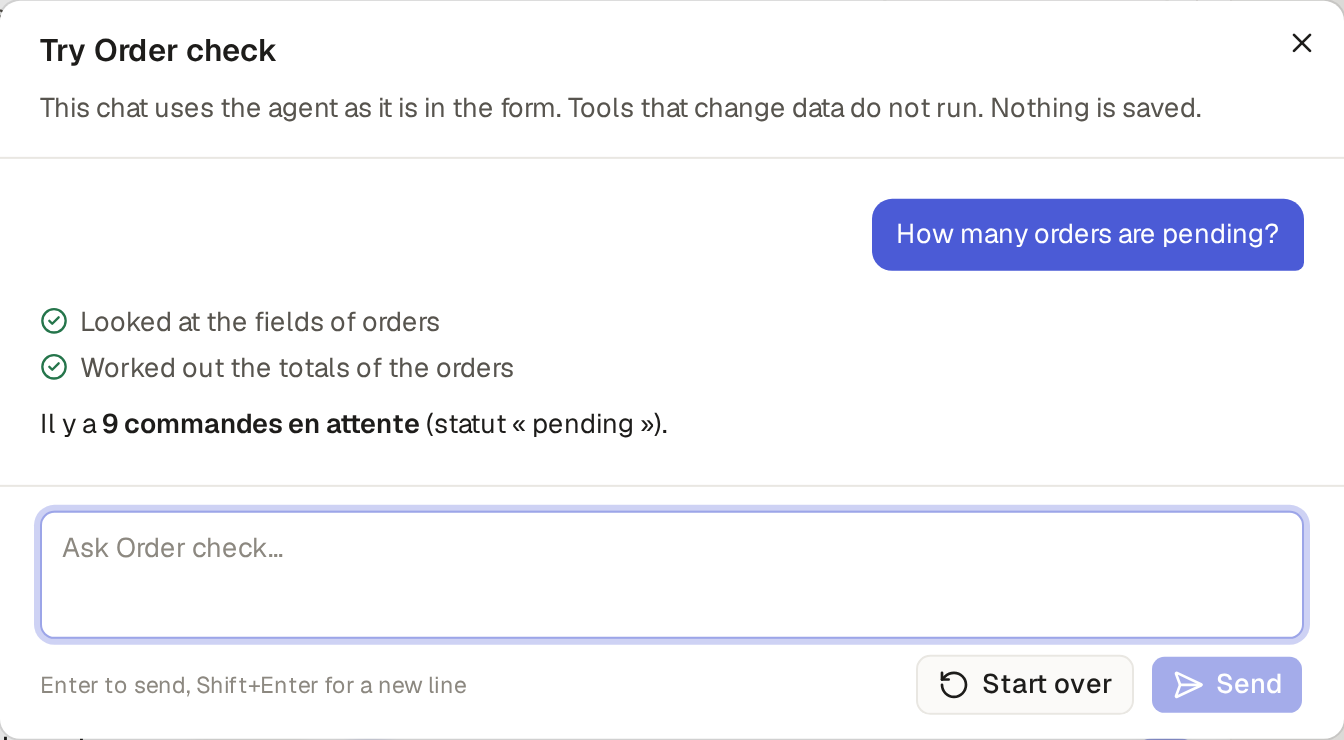
A try changes nothing. It runs as you, with what your role may see and do. What the agent reads, it reads for real. A change, such as a new customer or a comment, does not happen: the answer lists it as "Would create a customer", and the agent is told it is done, so it goes on. A tool of an MCP server does not run either ("Would call …"). Nothing is kept: no chat in your chats, no item, and the saved agent stays as it was until you click Save.
Limits and details:
- A machine agent has no Try it.
- An agent on the Claude API or the OpenAI API can be tried only after you pick its API key: until then, Try it is off. It answers from its service, with its API key, and uses none of the plan's AI.
- Each answer uses the plan's AI as any run of the agent. If agents have reached this month's fair-use limit, the try stops and says so.
- Start over clears the chat; closing the box drops it.
Or ask the assistant, such as "Try Order check with the instructions 'Always answer in French.' and ask how many
orders are pending." The same is there under the API token of an admin or an AI manager (Use your base from a calendar or a script), at POST /api/builder/agents/try, with the agent as you would save it and the chat so far, and
through Base Captain's MCP server, as the tool try_agent.
A chat with an agent opens in the assistant's panel, for the users of the roles that may chat with that agent.
- Signed in as a salesperson, click Orders in the sidebar, and click Assistant.
- At the top of the panel, click Chat with…, the plus: under Chat with it lists the assistant and the agents your role may chat with, each with its picture. Pick Order check: a new chat with it starts. An agent with a greeting shows it first (Give an agent a picture). The plus shows only when your role may chat with an agent.
- Ask, for example, "Which of my orders are high priority?" Order check reads the orders and shows them: the list filters to the salesperson's high-priority orders.
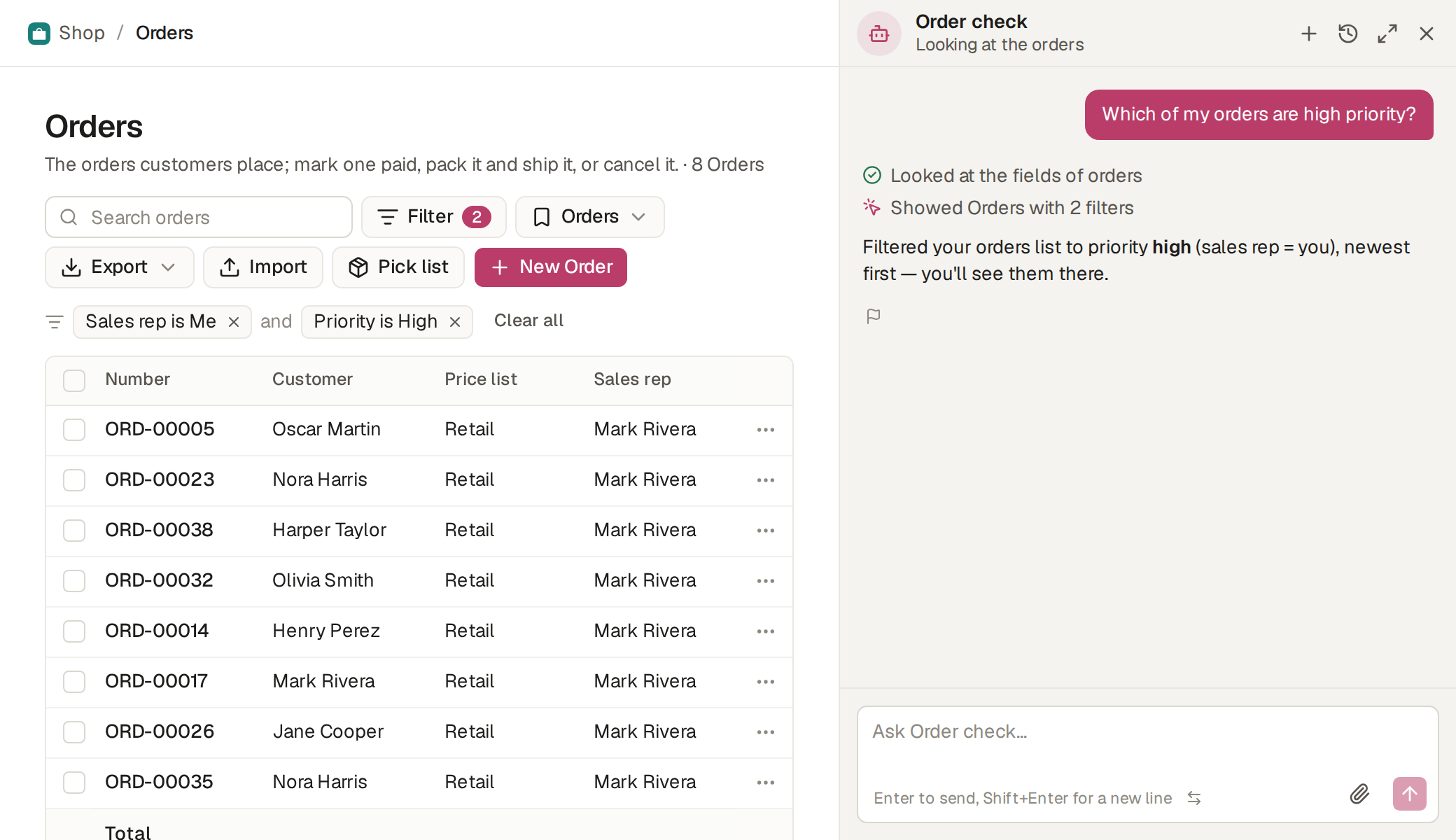
In a chat an agent acts as you, with your permissions: it finds only what you may see and changes only what you may change. In the example shop, Order check shows Mark, a salesperson, his own orders and none of Jane's. Jane, a manager, is not offered Order check at all, since her role is not among those that may chat with it, but she finds there the Order helper made in Make an agent, which ticks Manager.
In a chat an agent can do what the assistant can do for you, in Base Captain and on a machine alike: if you build the base, it can add a field or a table, change how the base works or invite a user; if you do not, neither can it. What the assistant asks you to confirm, the agent asks the same way, on a card: a change to the base, a delete, a bulk edit (See a change before it happens). Its answer ends at the card, and nothing happens until you click Apply; then it goes on in the same chat. Click Cancel, or write a new message instead, and the agent is told that you declined.
- It knows the page you are on and can open a list or a form for you, as the assistant does.
- You may drop a spreadsheet, a photo or a PDF, as with the assistant (Build tables or fill in items from a photo or a PDF); a machine agent reads a photo or a PDF by asking about it, as it reads an item's files (Let an agent read an item's photos and PDFs).
- If you build the base, it writes the base's code as the assistant does, behind a card with Show code (Add buttons and behaviour with the assistant).
- An agent on Base Captain helps only with the base's work and the job its instructions give it, as the assistant does (What the assistant helps with, and what it does not). An agent on the Claude API or the OpenAI API, whose AI your account pays for, does not have this rule.
- Chats with agents are listed under History at the top of the panel, in Other chats, below the parts of your conversation with the assistant (Your conversation with the assistant, and its history).
An agent works by itself when an automation or a workflow gives it an item. It then acts as itself, under its own role, and what that role may not see or change it cannot either.
- In Builder, on the Automations page of Orders, the example shop's When an order is created, run Order check has one action, Run an agent: the agent Order check, told "Set the priority of order {{number}}."
- Create an order: in the sidebar, click Orders, then New Order, pick a customer and save.
- Within a few seconds the order has a Priority, and its history shows "Order check changed this order, via agent".
In a workflow, a step's agent is told the step's instructions and ends its turn with one of the step's outcomes (Move items from step to step with workflows). Each run shows in the item's Workflow box and on its table's Workflows page.
Every run an agent makes by itself is listed in Activity, Agent runs, newest first: the agent (and its machine, if it runs on one), what started it (the automation, or the workflow and its step), its item as a link, its state, and for a failed run why it failed, when it started and how long it took, and beside its state, why it fell short, if it did (Find out why a run fell short). The example shop lists Order check's runs on orders, one of them failed. A person's chats with an agent are theirs and are never listed there.
Limits and details:
- Working by itself, an agent has a shorter list of tools: it works on the base's items, with its skills and MCP servers, and is given nothing that needs a card, since nobody is there to click it.
- An agent that has Base Captain's MCP server among its MCP servers, such as to reach another base of yours, gets the same short list there. Any other tool of that base answers "A person must do this: a run that no person watches cannot use delete_item."
- It also has
read_base_captain_page, which reads a page of this site to answer a question about Base Captain itself (Keep an agent from the web). - By itself, an agent reads no file of the Files page unless an admin turns on Let agents read the Files in Settings, AI settings. Then the base's agents with a staff role read the folders and the files there, but cannot add, change or delete a file. No assistant, agent or AI client turns it on (Let agents read the Files when they work by themselves).
Every mail that an agent sends ends with a line of its own, such as "This message is from Intake, an AI agent.", with the agent's name, or the assistant's name for the assistant. This is true of a Send an email action that the agent runs and of a mail from the base's code, in a chat and when the agent works by itself, since no person read the mail before it went. Base Captain adds the line, and the agent's instructions cannot remove it. A mail that a person sends has no such line.
Your customers meet an agent's words only by mail: a user of an outside role does not see an agent's comments.